 Aditya VardhanandGitHub
4ad83f8861
Aditya VardhanandGitHub
4ad83f8861
* Prevent empty CodeMode results through clearer guidance

* Make CodeMode return guidance unambiguous
Code Mode
Replace individual tool calls with a single sandboxed Python execution environment.
The problem
Standard tool calling requires one model round-trip per tool call. An agent that needs to fetch 10 items and process each one makes 11+ model calls -- slow, expensive, and context-heavy.
The solution
CodeMode wraps your tools into a single run_code tool. The model writes Python code that calls multiple tools with loops, conditionals, variables, and asyncio.gather -- all inside a sandboxed Monty runtime.
| Standard tool calling | Code mode |
|---|---|
| 1 model call per tool | 1 model call for N tools |
| Sequential by default | Parallel via asyncio.gather |
| No local computation | Filter, transform, aggregate in code |
| Large conversation history | Compact -- fewer messages |
Usage
from pydantic_ai import Agent
from pydantic_ai_harness import CodeMode

agent = Agent('anthropic:claude-sonnet-4-6', capabilities=[CodeMode()])

@agent.tool_plain
def get_weather(city: str) -> dict:
    """Get current weather for a city."""
    return {'city': city, 'temp_f': 72, 'condition': 'sunny'}

@agent.tool_plain
def convert_temp(fahrenheit: float) -> float:
    """Convert Fahrenheit to Celsius."""
    return round((fahrenheit - 32) * 5 / 9, 1)

result = agent.run_sync("What's the weather in Paris and Tokyo, in Celsius?")
print(result.output)
The model writes code like:
import asyncio

paris, tokyo = await asyncio.gather(
    get_weather(city='Paris'),
    get_weather(city='Tokyo'),
)
paris_c = await convert_temp(fahrenheit=paris['temp_f'])
tokyo_c = await convert_temp(fahrenheit=tokyo['temp_f'])
{'paris': paris_c, 'tokyo': tokyo_c}
In practice
The harness Quick start wires CodeMode up against an MCP server and a web search and asks it to find the most-discussed Hacker News story across three feeds, pull the comment thread and the submitter's profile, and search the web for follow-up coverage. CodeMode collapses that into two run_code calls: the first fetches all three feeds in parallel via asyncio.gather, dedupes by id, filters by score, and ranks by comment count -- in plain Python; the second batches the three follow-up calls (hn_get_thread, hn_get_user, duckduckgo_search) together.
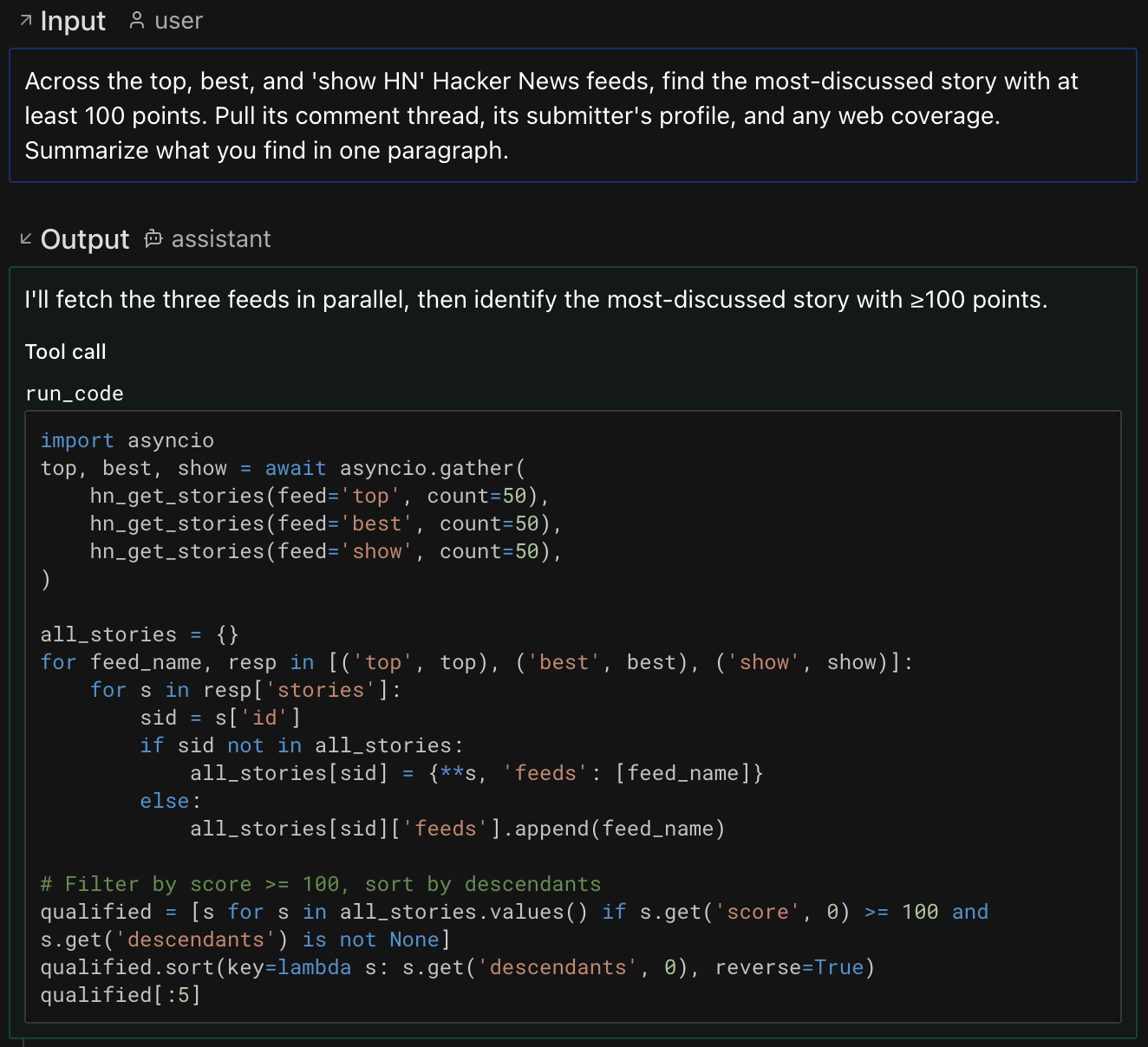
See the full Logfire trace -> Each run_code span fans out into the tool calls the model issued from inside the sandbox -- the easiest way to understand what code mode actually did. See the Pydantic AI Logfire docs for setup details.
Installation
Code mode requires the Monty sandbox:
uv add "pydantic-ai-harness[codemode]"
The code-mode extra is also supported as an alias.
Selective tool sandboxing
By default, CodeMode(tools='all') sandboxes every tool. You can control which tools go through the sandbox:
# By name -- only these tools are available inside run_code
CodeMode(tools=['search', 'fetch'])

# By predicate
CodeMode(tools=lambda ctx, td: td.name != 'dangerous_tool')

# By metadata -- combine with SetToolMetadata or .with_metadata()
CodeMode(tools={'code_mode': True})
Tools that match the selector are wrapped inside run_code. Non-matching tools remain available as regular tool calls.
Tool Search
When you mark tools or whole toolsets defer_loading=True (Tool Search), CodeMode keeps them out of run_code while they're undiscovered -- they pass straight through, so Tool Search drives them as usual (sent on the wire with defer_loading on providers with native tool search; otherwise dropped until discovered, with a search_tools tool alongside run_code). Once the model discovers a tool it comes back with defer_loading=False, and from then on CodeMode folds it into run_code like any other tool, so it's callable from generated code.
That fold-in grows run_code's description, which invalidates the prompt-cache prefix once at the moment of discovery (turns with no discovery stay cache-warm). Two ways to avoid the bust:
- Pass
dynamic_catalog=Trueto keeprun_code.descriptionstatic across discoveries -- the catalog of sandboxed-tool signatures moves into agent instructions (as a dynamicInstructionPart) and newly-discovered tools are announced viactx.enqueueinstead of by rebuilding the description:
CodeMode(dynamic_catalog=True)
This pays off when paired with Tool Search: the tool-definitions block stays byte-stable so the prefix cache survives discoveries, at the cost of a larger (but cache-friendly) system prompt. With a fixed toolset and no Tool Search, the default keeps the system prompt shorter and is the better choice.
- To instead keep a Tool Search corpus fully native -- never folded into
run_code, but not callable from inside it -- exclude it with atoolsselector; corpus members carrywith_nativeset to the managing native tool:
CodeMode(tools=lambda ctx, td: td.with_native is None)
Metadata-based selection
Use metadata when the decision should travel with a tool or toolset, rather than
with one CodeMode instance. This is useful for shared toolsets: the toolset
author can tag the tools that are safe and useful to call from generated code,
and each agent can opt into that tag with CodeMode(tools={...}).
CodeMode(tools={'code_mode': True}) uses the standard Pydantic AI
ToolSelector metadata form. A tool is sandboxed when its
ToolDefinition.metadata contains all of the selector's key-value pairs. Extra
metadata on the tool is fine, and nested dictionaries are matched by deep
inclusion.
The common pattern is to tag an entire toolset with .with_metadata(...):
from pydantic_ai import Agent
from pydantic_ai.toolsets import FunctionToolset
from pydantic_ai_harness import CodeMode

search_tools = FunctionToolset(tools=[search, fetch]).with_metadata(code_mode=True)

agent = Agent(
    'anthropic:claude-sonnet-4-6',
    toolsets=[search_tools],
    capabilities=[CodeMode(tools={'code_mode': True})],
)
Here search and fetch are removed from the model-facing tool list and
become callable functions inside run_code. Tools without
metadata['code_mode'] == True stay visible as regular tool calls.
Return values
The last expression in the code snippet is automatically captured as the return value -- the model does not need to print(). An assignment stores a value in the REPL but does not return it. A final expression that evaluates to None is also treated as no result. Without a non-None final expression or print output, run_code returns {}. Put the assigned name on the final line:
result = await get_weather(city='Paris')
result
| Scenario | Return |
|---|---|
Non-None final expression with no print output |
Last expression value |
Final assignment or None result with no print output |
{} |
Print output with no final expression or a None result |
{"output": "<printed text>"} |
Print output with a plain, non-None final expression |
{"output": "<printed text>", "result": <last expression>} |
| Multimodal final expression with no print output | Returned natively for model processing |
| Print output with a multimodal final expression | List with printed text followed by native multimodal content |
REPL state
State persists between run_code calls within the same agent run -- variables, imports, and function definitions carry over. Pass restart: true in the tool call to reset state.
Observability
Nested tool calls inside run_code produce their own spans when instrumented with Logfire or any OpenTelemetry backend. The run_code tool return includes metadata with all nested calls:
for msg in result.all_messages():
    for part in msg.parts:
        if isinstance(part, ToolReturnPart) and part.tool_name == 'run_code':
            tool_calls = part.metadata['tool_calls']    # dict[str, ToolCallPart]
            tool_returns = part.metadata['tool_returns'] # dict[str, ToolReturnPart]
Filesystem and OS access
Sandboxed code runs with no access to the host's files, environment, or clock. Two parameters grant it -- reach for them when the agent's task genuinely needs the host.
mount -- share host directories. Reach for this when the agent works with real files: analyzing
a dataset you've dropped in a folder and writing a report back, editing a checkout, or processing a
batch of documents. Sandboxed pathlib code reads and writes under the mounted path. (For
environment variables or the clock, use os_access instead.)
from pydantic_monty import MountDir

from pydantic_ai_harness import CodeMode

# The agent can read /work/data.csv and write /work/summary.md back to the host:
CodeMode(mount=MountDir('/work', '/tmp/agent-workspace', mode='read-write'))
os_access -- answer the sandbox's OS calls yourself. Reach for this when the agent needs
environment variables, the current date and time, or filesystem behavior you control. Hand it a
ready-made OS implementation, or a callback that decides each call -- so you can inject just the
secrets it needs, pin "now" for reproducible runs, or route file access to your own store.
from pydantic_monty import NOT_HANDLED, OSAccess

from pydantic_ai_harness import CodeMode

# Give the agent a fixed set of environment values:
CodeMode(os_access=OSAccess(environ={'API_BASE': 'https://api.example.com'}))


# ...or intercept each call to decide what the agent may see:
allowed_env = {'API_KEY': 'sk-...'}


def my_os(fn, args, kwargs):
    if fn == 'os.getenv':
        # Answer the call: allow-listed keys resolve, every other key reads back
        # as None -- absent, exactly like a real unset variable.
        return allowed_env.get(args[0])
    # Refuse everything else: NOT_HANDLED makes the call fail in the sandbox.
    return NOT_HANDLED


CodeMode(os_access=my_os)
Your callback's return value decides the call's fate, and the two outcomes are easy to confuse:
- Return any value -- including
None,'', or0-- and that becomes the result the sandbox sees.os.getenvreturningNonelooks exactly like a normal unset variable, so the agent's code keeps running. This is how you hide something: answer with an empty value. - Return
NOT_HANDLEDand the call is treated as unsupported: it raises inside the sandbox and the model gets a retry. This refuses a capability outright -- use it to block, not to say "no value". ReturningNOT_HANDLEDfor a key the agent reasonably expects will burn retries.
Both expose the real host to model-written code, so grant only what the task needs. Access is fixed
when the capability is built, so construct CodeMode per request to scope it.
A MountDir defaults to copy-on-write mode='overlay': the sandbox reads host files and sees its
own writes, but those writes do not reach the host. Pass mode='read-write' to persist them, or
mode='read-only' to forbid writes.
Monty-specific: these hooks use Monty's
AbstractOS/MountDirtypes.
Sandbox restrictions
Code runs inside Monty, a sandboxed Python subset. Key restrictions:
- No class definitions
- No third-party imports (allowed stdlib:
sys,typing,asyncio,math,json,re,datetime,os,pathlib) - No wall-clock or timing primitives by default (
asyncio.sleep,datetime.datetime.now(),datetime.date.today(),time) --datetime.datetime.now()/datetime.date.today()become available with anos_accesshandler (above);asyncio.sleep/timenever do - No
import * - Filesystem I/O needs an
os_accesshandler or amount;os.getenv/os.environneed anos_accesshandler - Tools requiring approval or with deferred (
CallDeferred) execution are sandboxed like any other tool; without aHandleDeferredToolCalls(or equivalent) capability on the agent to resolve them inline, calling one fromrun_coderaises an error that surfaces to the model as a retry
API
CodeMode(
    tools: ToolSelector = 'all',        # 'all', list[str], callable, or dict
    max_retries: int = 3,               # retries on sandbox execution errors
    os_access: CodeModeOS | None = None,   # host handler for env vars, clock, and file I/O
    mount: CodeModeMount | None = None,    # host directories to share with the sandbox
    dynamic_catalog: bool = False,      # keep run_code's description cache-stable; catalog moves into instructions
)
Agent spec (YAML/JSON)
CodeMode works with Pydantic AI's agent spec feature for defining agents in YAML:
# agent.yaml
model: anthropic:claude-sonnet-4-6
capabilities:
  - CodeMode: {}
from pydantic_ai import Agent
from pydantic_ai_harness import CodeMode

agent = Agent.from_file('agent.yaml', custom_capability_types=[CodeMode])
result = agent.run_sync('...')
print(result.output)
Pass custom_capability_types so the spec loader knows how to instantiate CodeMode. You can also pass arguments in the YAML:
capabilities:
  - CodeMode:
      tools: ['search', 'fetch']
      max_retries: 5
Further reading
- Tool use via code (Anthropic)
- Code mode in production (Cloudflare)
- Pydantic AI capabilities